

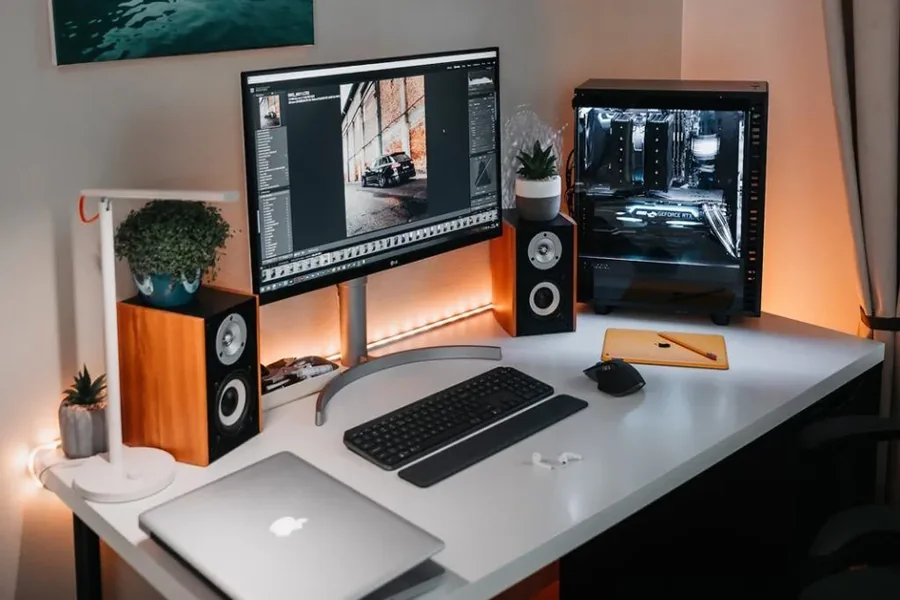
You do not need a big budget to fix home office lighting. You need a plan, a few smart purchases, and some free changes to your desk setup.
Poor light makes long days harder. Your eyes ache by noon. Your head feels heavy by three. You lean toward the screen without noticing.
This guide shows you how to light a workspace for 8 hours or more without overspending. It covers free fixes, cheap gear, and the mistakes that waste money.
Quick Answer: What Is the Best Low-Cost Lighting for a Home Office?
The best low-cost lighting setup uses three layers. Start with free natural light from a window. Add one adjustable LED desk lamp for your work surface. Finish with a soft background light, such as a cheap lamp or LED strip, to cut contrast with your screen.
That combination costs far less than a full lighting redesign. It also covers most of what your eyes need.
Why Good Home Office Lighting Matters
Lighting is easy to ignore. You can work in a dim room and still finish tasks. But the cost shows up slowly, and it adds up over long days.
It Reduces Eye Strain
Screens are bright. If the room around them is dark, your eyes keep adjusting between the two. That constant effort causes eye strain, dryness, and blurry vision.
Glare makes it worse. A window reflecting off your monitor forces you to squint. A bare bulb above your screen does the same.
Common signs of poor lighting include:
- Tired or burning eyes
- Headaches near the temples
- Neck pain from leaning forward
- Trouble reading small text
- Feeling sleepy during the day
It Supports Focus and Energy
Light affects how alert you feel. Bright, cool-toned light in the daytime helps most people stay awake. Warm, dim light in the evening helps the body wind down.
A well-lit desk also makes work feel easier. You read faster and make fewer mistakes when you can see clearly.
It Is One of the Cheapest Upgrades
Ergonomic chairs and standing desks can cost a lot. Budget lighting does not. A good desk lamp and a proper bulb often cost less than a single month of coffee shop visits. For the comfort you get back, it is one of the best-value upgrades in a home workspace.
Understand the Three Layers of Office Lighting
Lighting designers talk about “layers.” You do not need to be a designer to use the idea. It simply means one light source is rarely enough.
| Layer | What It Does | Low-Cost Examples |
|---|---|---|
| Ambient lighting | Lights the whole room evenly | Ceiling light, floor lamp, window light |
| Task lighting | Lights your desk and papers | Adjustable desk lamp, clip-on lamp |
| Accent / bias lighting | Softens contrast behind the screen | LED strip, small table lamp |
A single ceiling light leaves shadows on your desk. A single desk lamp in a dark room strains your eyes. Layers fix both problems.
If your budget is tight, build the layers in this order: natural light first, task lamp second, background glow third.
Start with Free Natural Light
Natural light costs nothing. It is also the most comfortable light for most people during the day. Before you buy anything, make the most of the windows you have.
Place Your Desk Smartly
Where you put your desk matters more than most people think.
- Sit sideways to the window. Light from the left or right avoids glare on the screen.
- Avoid facing the window directly. You will squint against the brightness.
- Avoid having the window behind you. It creates reflections on your monitor.
Moving a desk costs nothing. It can solve half of your lighting trouble in ten minutes.
Control Glare with Curtains and Blinds
Bright sun can be as bad as a dark room. Use sheer curtains or adjustable blinds to soften harsh light. Sheer fabric lets daylight in but spreads it out, so it feels gentler on your eyes.
Avoid blackout curtains during work hours unless you need them. They remove the free daylight you are trying to use.
Know When Daylight Is Not Enough
Daylight changes fast. A bright morning can turn into a gloomy afternoon. Winter days are short. Rainy days are dark.
That is why you still need artificial lights, even in a sunny room. Think of daylight as your base, not your only source.
Choose a Budget Desk Lamp That Works
If you buy one thing, buy a good LED desk lamp. It lights your keyboard, notes, and papers without lighting the whole room. It is also the easiest way to improve task lighting.
Features Worth Paying For
You do not need an expensive model. Look for these basics:
- Adjustable arm or head. You should be able to aim the light away from your screen.
- Several brightness levels. One fixed setting rarely suits morning and evening.
- Adjustable color temperature. Warm and cool modes help across the day.
- A stable base or strong clamp. A lamp that wobbles gets annoying fast.
- Low heat output. LED lamps stay cooler than old halogen ones.
Many affordable lamps now offer all of these features. You often do not need a premium brand to get them.
Features You Can Skip
Some extras add cost without adding comfort. You can usually skip:
- Built-in speakers
- Complex app control
- Wireless charging pads, unless you truly want one
- Decorative designs that limit adjustment
Where to Place the Desk Lamp
Placement is as important as the lamp itself.
- Right-handed? Put the lamp on your left side.
- Left-handed? Put it on your right.
This stops your hand from casting a shadow over what you write. Aim the light at your work surface, not straight at your face or monitor.
Desk Lamp Types Compared
| Type | Best For | Typical Price Level | Main Drawback |
|---|---|---|---|
| Basic LED desk lamp | General desk work | Low | Fewer features |
| Clip-on lamp | Small or crowded desks | Low | Clamp may not fit all desks |
| Adjustable-color LED lamp | All-day use | Low to mid | Slightly higher cost |
| Monitor light bar | Small desks, screen-heavy work | Mid | Not ideal for paper tasks |
Prices vary a lot by country and store, so compare a few options before buying.
Pick the Right Light Bulbs
Bulbs are the quiet heroes of budget lighting. A cheap fixture with a good bulb often beats an expensive fixture with a bad one. Two numbers matter most: brightness and color temperature.
Brightness: Understand Lumens
Lumens measure how bright a bulb is. Watts only tell you how much power it uses. Check lumens when you shop.
Many lighting guides suggest roughly 300 to 500 lux of light on a work surface for office tasks. You do not need a light meter to get close. A bright ceiling light plus a desk lamp usually does the job. If you squint at documents or notice shadows on your keyboard, you likely need more light.
Color Temperature: Warm Versus Cool
Color temperature is measured in Kelvin (K). Lower numbers look warm and yellow. Higher numbers look cool and blue-white.
| Kelvin Range | Light Appearance | Best Use |
|---|---|---|
| 2700K–3000K | Warm, cozy | Evenings, relaxing |
| 3500K–4000K | Neutral white | General office work |
| 5000K–6500K | Cool daylight | Focused daytime tasks |
For long days, a neutral white of about 4000K is a safe middle choice. Many people like cooler light in the morning and warmer light later in the day.
Very cold light for ten hours straight can feel harsh. Very warm light can make you sleepy. A flexible bulb or lamp solves this.
Color Rendering and Flicker
Two quieter details are worth a quick check.
- CRI (Color Rendering Index). A higher number, ideally 80 or above, means colors look more natural.
- Flicker. Cheap bulbs can flicker in ways you barely notice but your eyes still feel. If a bulb gives you headaches, replace it with a better-made one.
Why LED Is the Smart Choice
LED bulbs are the best low-cost option for most offices. They use less electricity, last far longer, and run cooler than older bulb types. You may pay a bit more upfront. You save money over time on energy and replacements.
Add Bias Lighting and Soft Background Glow
Here is a trick many people miss. A bright screen in a dark room is tiring. Your eyes keep adapting to the big difference between the two.
Bias lighting fixes this. It is a soft light placed behind your monitor. It lowers the contrast between the screen and the wall, so your eyes work less.
Use a Cheap LED Strip
An LED strip is one of the cheapest ways to add bias lighting.
- Stick it on the back of your monitor.
- Point it at the wall behind the screen.
- Use a neutral or warm white setting.
Keep the brightness low. You want a gentle glow, not a nightclub. Skip loud colors during work hours, since they can distract you.
Use a Small Lamp as Backup
No LED strip? A small table lamp behind or beside your monitor works too. Choose a warm bulb with low brightness. The goal is the same: reduce the contrast between your screen and the room.
Add a Floor Lamp for Ambient Light
If the room feels dark in the corners, a floor lamp can help. It spreads light upward and outward. It also makes the room feel less like a cave. Basic floor lamps are often cheap, and you can pair them with a good bulb for a big comfort boost.
Avoid Glare and Reflections
Glare is a hidden enemy. Even good lights cause trouble if they bounce off the wrong surface.
Try these quick fixes:
- Tilt your monitor slightly to avoid reflections.
- Lower screen brightness to match the room.
- Use a matte screen filter if reflections stay stubborn.
- Move lamps to the side instead of behind or above the screen.
- Avoid bare overhead bulbs directly above your head.
A simple test helps. Turn off your monitor and look at the dark screen. Any bright shapes you see are reflections. Move the light source or the screen until they disappear.
Light Your Face for Video Calls
Many remote workers spend hours on video calls. Poor lighting makes you look tired, even when you are not.
The cheapest fix is simple. Face a window during calls so daylight lands on your face. If that is not possible, place a lamp behind or beside your screen, aimed at the wall or ceiling to bounce soft light back at you.
Avoid sitting with a bright window behind you. The camera will turn you into a dark silhouette.
A soft, diffused light looks better than harsh, direct light. If your desk lamp is too strong, point it at a white wall instead of at your face.
Match Your Lighting to the Time of Day
Your body follows a daily rhythm, often called the circadian rhythm. Light is one of its strongest signals. Static lighting all day can confuse it.
A simple schedule helps:
| Time of Day | Suggested Lighting |
|---|---|
| Morning | Bright, neutral-to-cool light; use daylight if you can |
| Midday | Bright, neutral light; keep screen glare low |
| Late afternoon | Slightly warmer tone; reduce overhead brightness |
| Evening | Warm, dim light; avoid harsh blue-white tones |
You can do this without smart gadgets. Use a desk lamp with adjustable color settings, or keep two bulbs and switch between them. If you already own a smart bulb, scheduling it is a bonus, but not a requirement.
If you work late, dim the room lights an hour before bed when possible. Bright cool light late at night can make it harder to fall asleep.
Sample Low-Cost Lighting Plans
Not sure where to begin? Use one of these plans. Choose the one that fits your situation and budget.
| Plan | What You Do | Best For |
|---|---|---|
| Free Reset | Move the desk, adjust curtains, tilt the screen, switch to a better bulb you already own | Zero budget |
| Starter Setup | Free Reset plus one adjustable LED desk lamp | Most people |
| Comfort Setup | Starter Setup plus an LED strip behind the monitor | Long screen days |
| Complete Setup | Comfort Setup plus a floor lamp and neutral ceiling bulbs | Dark or windowless rooms |
You can build these step by step. Start with the first plan. Add the next layer only if you still feel discomfort.
Common Lighting Mistakes to Avoid
Many people waste money by repeating the same errors. Watch out for these.
- Relying only on the ceiling light. It creates shadows on the desk.
- Buying the cheapest bulb without checking lumens. It may be too dim.
- Choosing very cold light for the whole day. It can feel harsh over time.
- Placing the lamp on the wrong side. Your hand blocks the light.
- Ignoring glare. Expensive lights will not fix a reflecting window.
- Working in a dark room with a bright screen. This is the fastest way to tired eyes.
- Buying smart features you will not use. Extras add cost, not comfort.
Take Care of Your Eyes Too
Lighting helps, but habits matter as well. Even a perfect setup cannot replace regular breaks.
Try the 20-20-20 rule. Every 20 minutes, look at something about 20 feet away for at least 20 seconds. It gives your eye muscles a rest.
A few other habits help:
- Blink often. Screens make people blink less, which dries the eyes.
- Keep the screen at arm’s length.
- Set text size so you do not need to lean in.
- Step outside for a few minutes at midday. Daylight and distance vision are a good reset.
If eye pain or headaches keep coming back, talk to an eye care professional. Good lighting is helpful, but it does not replace a proper eye exam.
Quick Home Office Lighting Checklist
Use this list to review your setup in a few minutes.
- Desk sits sideways to the window
- No glare on the screen
- One adjustable desk lamp on the correct side
- Neutral white bulbs, around 4000K, in the main light
- Soft bias lighting behind the monitor
- Room is not dark compared with the screen
- Warmer, dimmer light for the evening
- Short breaks scheduled through the day
Frequently Asked Questions
How bright should a home office be?
Aim for bright, even light, often around 300 to 500 lux on your desk. If you squint or see shadows, add more light.
What color light is best for working all day?
Neutral white light, around 4000K, suits most people. Use cooler tones in the morning and warmer tones later.
Is a desk lamp really necessary?
Yes, for most setups. A ceiling light alone often leaves shadows and uneven light on your work surface.
Are LED strip lights good for a home office?
Yes, when used as soft bias lighting behind your monitor. Keep brightness low and colors neutral.
Can cheap lighting still protect my eyes?
Yes. Good placement, glare control, and a decent LED bulb matter more than a high price.
Should I use warm or cool light in the evening?
Use warm, dim light in the evening. It feels calmer and is less likely to disturb your sleep.
How can I reduce screen glare for free?
Tilt the monitor, move the desk sideways to the window, and use sheer curtains. Lower the screen brightness to match the room.
Do I need smart bulbs?
No. They are convenient for scheduling, but a lamp with adjustable settings works just as well.
Final Thoughts
Lighting a home office for long days does not have to be expensive. The best results come from simple choices made in the right order.
Start with free fixes. Place your desk well, soften the window light, and fight glare. Then add a good LED desk lamp, choose a sensible bulb, and add a small background glow behind your screen. Match your light to the time of day, and take short breaks to rest your eyes.
You will feel the difference within a few days. Your eyes will stay fresher, your focus will last longer, and your workspace will feel more comfortable. That is a big return for a small spend.
